Every comparison article you have read about AI models follows the same formula: take a few cherry-picked prompts, run them through each model, paste the outputs side by side, and declare a winner. The results are usually meaningless because nobody uses AI models for carefully crafted benchmark prompts. We use them for messy, real-world tasks where the differences between models actually matter.
We used DeepSeek, ChatGPT (GPT-5), Claude (3.5 Sonnet and Opus 4), and Gemini 2.5 as daily tools for two months. Not testing. Using. For writing, coding, analysis, brainstorming, and the hundreds of small tasks that knowledge workers actually need AI for. Here is what we found.
The Quick Answer (For People Who Hate Reading)
If you want one model and do not care about the details: ChatGPT is the safest all-around choice. It is the best at nothing but bad at nothing either. It works.
If you care about the details, keep reading. Because the “best” model depends entirely on what you are doing with it.
DeepSeek: The Model That Changed the Game
DeepSeek came out of nowhere in early 2025 and forced every major AI lab to rethink their pricing strategy. A Chinese AI lab producing models that compete with GPT-4 at a fraction of the cost was not something anyone expected. DeepSeek R1, their reasoning-focused model, and DeepSeek V3, their general-purpose model, remain some of the most cost-effective options available.
Where DeepSeek Excels
Math and logical reasoning. DeepSeek R1’s chain-of-thought reasoning is genuinely impressive. For complex math problems, logic puzzles, and structured analytical tasks, it consistently matches or beats GPT-5. We tested it on financial modeling, statistical analysis, and algorithm design, and the results were strong across the board.
Coding at scale. DeepSeek Coder V3 is remarkably capable for a model that costs a fraction of its competitors. For standard development tasks, writing functions, debugging code, explaining codebases, it performs within 90 percent of Claude’s quality. For teams that process high volumes of code-related queries, the cost savings are significant.
Cost efficiency. This is the real story. DeepSeek API pricing is roughly 10 to 20 times cheaper than OpenAI or Anthropic for comparable output quality. DeepSeek V3 costs about $0.27 per million input tokens and $1.10 per million output tokens. Compare that to GPT-5 at $10 and $30 respectively. For businesses running AI at scale, that difference is enormous.
Where DeepSeek Falls Short
Nuanced writing. DeepSeek produces competent but unremarkable prose. It follows instructions well but lacks the stylistic range that Claude offers. If you need writing that sounds human and adapts to different tones, DeepSeek is not your first choice.
Cultural and Western context. DeepSeek was trained primarily on Chinese and English data, and it occasionally shows. References to Western pop culture, idioms, and cultural nuances can be slightly off. Not wrong, just slightly off in a way that feels like talking to someone who learned English from textbooks rather than conversations.
Censorship and content restrictions. DeepSeek applies content restrictions that reflect Chinese regulatory requirements. Political topics, certain historical events, and some sensitive subjects will get deflected or produce carefully sanitized responses. For most business use cases, this does not matter. For research, journalism, or content creation that touches controversial topics, it is a real limitation.
Availability. DeepSeek’s API has had reliability issues, with occasional outages and rate limiting during peak usage. If you need guaranteed uptime for production applications, this is worth factoring in.
ChatGPT (GPT-5): The Reliable Workhorse
GPT-5 is what happens when you iterate on a good foundation for long enough. It is not a revolutionary leap over GPT-4. It is a polished, refined, and highly reliable model that does almost everything well.
Where ChatGPT Excels
General-purpose versatility. If you can only have one AI subscription, ChatGPT is the rational choice. It handles writing, coding, analysis, creative work, and conversation with consistent quality. No single task where it is the absolute best, but no task where it falls flat either.
Multimodal capabilities. GPT-5’s ability to process images, audio, and video alongside text is the most polished in the industry. Upload a photo of a whiteboard and ask it to convert the diagram to a structured document. Share a screenshot of an error message and get debugging suggestions. This works smoothly and reliably in ways that feel genuinely useful, not gimmicky.
Ecosystem and integrations. ChatGPT connects to more tools than any competitor. The GPT Store, plugins, custom GPTs, and direct integrations with tools like Canva, Zapier, and various data sources give it an ecosystem advantage that is hard to replicate. If your workflow involves bouncing between multiple tools, ChatGPT is probably the best hub.
Real-time information. ChatGPT’s web browsing is fast and effective. For tasks that require current information, stock prices, recent news, latest documentation, it reliably pulls in up-to-date data. Claude and DeepSeek both lag behind here.
Where ChatGPT Falls Short
Deep reasoning tasks. GPT-5 is smart, but for genuinely complex reasoning, multi-step logic, mathematical proofs, intricate code architecture, it is outperformed by both Claude Opus 4 and DeepSeek R1. The gap is not dramatic, but it is consistent.
Long-form writing quality. ChatGPT writes well but generically. Its default voice is what we call “LinkedIn optimistic”: professional, upbeat, and forgettable. You can prompt it into different styles, but it takes more effort than Claude to produce writing that actually sounds like a human with opinions.
Token efficiency. GPT-5 tends to be verbose. It uses more tokens to say the same thing compared to Claude, which translates directly into higher API costs for developers. For consumer use through the ChatGPT subscription this does not matter, but for API-heavy applications it adds up.
Price. ChatGPT Plus costs $20 per month, which is reasonable. But the API pricing for GPT-5 is among the most expensive, and the new Pro plan at $200 per month for “unlimited” access to the most capable models is a tough sell for individuals. You are paying for the ecosystem as much as the model.
Claude (3.5 Sonnet and Opus 4): The Writer’s and Developer’s Choice
Claude is the model we find ourselves reaching for most often for work that requires quality over speed. Anthropic has carved out a clear niche: Claude is the model that thinks carefully, writes distinctively, and codes with an understanding of software engineering rather than just syntax.
Where Claude Excels
Writing quality. This is not close. Claude produces the best prose of any current AI model. Not just grammatically correct, but stylistically aware. It adapts to tone, maintains voice consistency across long documents, and produces writing that requires minimal editing. For content creation, copywriting, and any task where the output will be read by humans, Claude is the clear leader.
Code comprehension and architecture. Claude does not just write code. It understands codebases. Ask it to review a pull request, and it will catch not just bugs but design issues, maintainability concerns, and potential scalability problems. Claude Code, the terminal-based agent, takes this further by operating directly in your repository with full context of your project structure.
Long context handling. Claude’s 200K token context window is not just a number on a spec sheet. It actually uses that context effectively. Upload a 100-page document and ask specific questions, and Claude will reference the right sections accurately. GPT-5 also supports long contexts but tends to “forget” information in the middle of very long documents (the well-documented “lost in the middle” problem). Claude handles this better.
Instruction following. Claude is the most obedient model we tested. Give it a detailed system prompt with specific requirements, and it follows them consistently. GPT-5 sometimes drifts from instructions over long conversations. DeepSeek occasionally ignores style guidelines. Claude stays on target.
Safety without being annoying. Claude refuses fewer reasonable requests than it used to. Anthropic has found a better balance between safety and usefulness. It will still decline genuinely harmful requests, but it no longer treats every edgy creative writing prompt like a potential crime.
Where Claude Falls Short
Speed. Claude is slower than ChatGPT for most tasks. Opus 4, the most capable model, is noticeably slower. For interactive use where you are waiting for each response, this friction adds up over a day of heavy use.
Multimodal limitations. Claude can process images and PDFs but cannot generate images, handle audio, or process video. In a world where GPT-5 and Gemini handle all of these, Claude’s text-and-image-only approach feels limited.
Web access. Claude does not browse the web. Its knowledge has a training cutoff, and while that cutoff is regularly updated, it cannot pull in real-time information like ChatGPT can. For research tasks that require current data, this is a meaningful limitation.
Pricing. Claude Pro costs $20 per month, same as ChatGPT Plus. But the API pricing for Opus 4 is premium: $15 per million input tokens and $75 per million output tokens. Sonnet 3.5 is much cheaper at $3 and $15, and is often good enough. Choosing between Sonnet and Opus for each task is part of using Claude effectively.
Gemini 2.5: The Overlooked Competitor
Google’s Gemini 2.5 Pro deserves more attention than it gets. It is not the default choice for most people, largely because Google’s consumer AI products (the Gemini app, AI Overviews) have been underwhelming. But the underlying model is genuinely competitive.
Where Gemini Excels
Massive context window. Gemini 2.5 Pro supports up to 1 million tokens of context, dwarfing every competitor. For tasks that involve processing very large documents, entire codebases, or extensive research materials, this is a real advantage.
Google ecosystem integration. If your work lives in Google Workspace, Gemini’s integration with Docs, Sheets, Gmail, and Drive is seamless. The AI features baked into Google Workspace are powered by Gemini, and they work well for summarizing emails, drafting documents, and analyzing spreadsheet data.
Multimodal depth. Gemini handles text, images, audio, and video natively. Its video understanding capabilities are ahead of GPT-5, able to process and reason about video content with genuine comprehension rather than just frame-by-frame analysis.
Coding. Gemini 2.5 Pro scores surprisingly well on coding benchmarks and performs competitively in our real-world testing. It is not quite at Claude’s level for architectural reasoning, but for straightforward development tasks it is a solid choice, especially given the generous free tier.
Where Gemini Falls Short
Consistency. Gemini’s output quality varies more than its competitors. On its best day, it matches Claude for writing quality and GPT-5 for reasoning. On its worst day, it produces responses that feel rushed and surface-level. The variance makes it harder to rely on for production workflows.
The Google trust factor. Google has a habit of launching AI products, iterating rapidly, and occasionally shutting things down. Bard became Gemini. Google Assistant is being absorbed into Gemini. For businesses building workflows around Gemini’s API, there is a lingering concern about long-term stability and API compatibility.
Writing voice. Gemini’s default writing style is the most “AI-sounding” of the major models. It tends toward safe, encyclopedic responses that read like a well-written Wikipedia article. Perfectly accurate, completely forgettable.
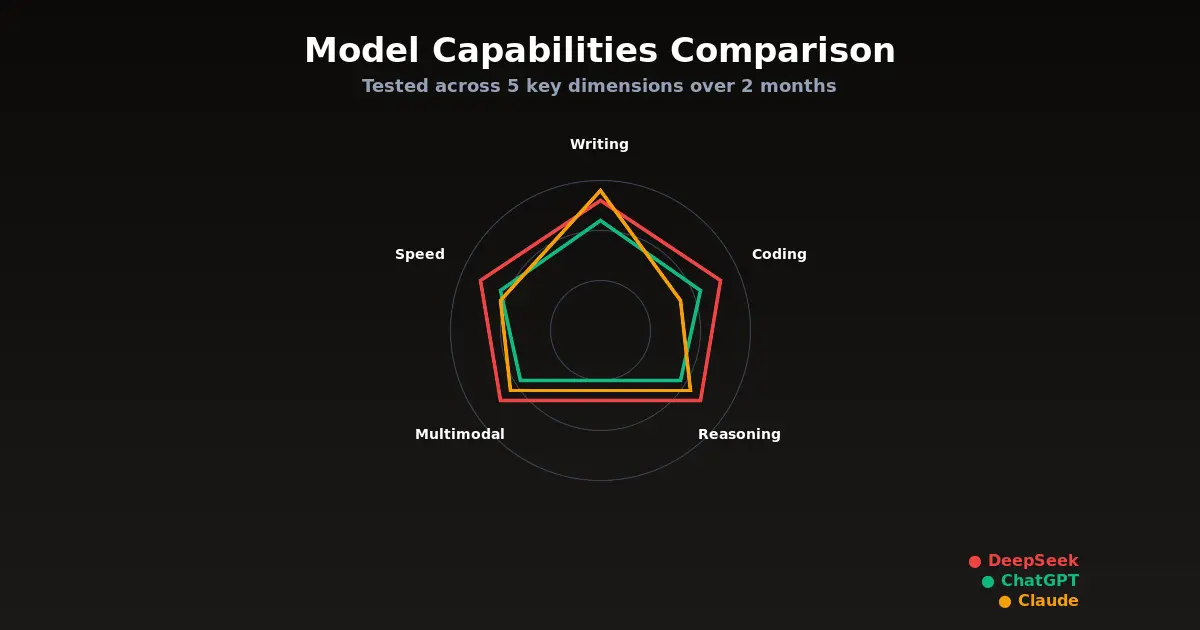
Head-to-Head: Real Tasks, Real Results
Enough generalizations. Here is how each model performed on specific tasks we run regularly:
Task 1: Summarize a 50-Page Business Report
Claude: Best summary. Captured nuance, highlighted what mattered, ignored what did not. Output felt like it was written by someone who understood the business context.
ChatGPT: Good summary, slightly longer than necessary. Included some details that were not important while missing some that were.
Gemini: Strong summary that benefited from the large context window. Handled the document length effortlessly.
DeepSeek: Adequate but surface-level. Hit the main points but missed subtle implications that the other models caught.
Winner: Claude, followed closely by Gemini.
Task 2: Debug a Complex Full-Stack Bug
Claude: Found the root cause after analyzing the relevant files. Suggested a fix that addressed the underlying issue rather than just the symptom. Claude Code handled this end-to-end.
ChatGPT: Identified the symptoms correctly but suggested a workaround rather than a proper fix on the first attempt. Got to the right answer with follow-up prompting.
DeepSeek: Strong performance here. The reasoning model methodically worked through the problem and arrived at the correct diagnosis. Took slightly longer but was thorough.
Gemini: Reasonable suggestions but required more hand-holding to stay focused on the actual problem rather than related but irrelevant issues.
Winner: Claude, with DeepSeek as a surprisingly strong second.
Task 3: Draft a Sales Email Sequence
Claude: Best copy by far. Each email had a distinct voice, clear value proposition, and natural-sounding language. Minimal editing needed.
ChatGPT: Competent but generic. The emails followed best practices but read like templates. Required significant editing to sound authentic.
Gemini: Similar to ChatGPT but slightly more formulaic. Fine for a first draft but needed substantial rework.
DeepSeek: Weakest performance. The emails were technically correct but lacked persuasive nuance. Cultural context occasionally felt slightly off.
Winner: Claude, and it was not close.
Task 4: Analyze a Dataset and Find Insights
ChatGPT: Best performance with its Code Interpreter. Wrote analysis code, generated visualizations, and surfaced insights that were genuinely non-obvious. The seamless integration of code execution makes ChatGPT the default choice for data work.
Claude: Strong analytical reasoning but lacks native code execution in the consumer product. Through the API with tool use, it matches ChatGPT. Through the chat interface, it falls behind.
DeepSeek: Excellent at the mathematical and statistical analysis. The reasoning model showed its strength here, catching correlations that other models missed.
Gemini: Good with data connected through Google Sheets. Limited when working with raw data outside the Google ecosystem.
Winner: ChatGPT for the integrated experience, DeepSeek for pure analytical depth.
Pricing Breakdown: What You Will Actually Pay
Here is the honest cost comparison for typical usage patterns:
| Plan | Monthly Cost | Best For |
|---|---|---|
| ChatGPT Plus | $20 | General use, multimodal tasks |
| ChatGPT Pro | $200 | Heavy API-like usage through chat |
| Claude Pro | $20 | Writing, coding, analysis |
| Gemini Advanced | $20 | Google Workspace users |
| DeepSeek (API) | $5-50 | High-volume API applications |
For API usage (developers building applications):
| Model | Input (per 1M tokens) | Output (per 1M tokens) |
|---|---|---|
| GPT-5 | $10.00 | $30.00 |
| Claude Opus 4 | $15.00 | $75.00 |
| Claude Sonnet 3.5 | $3.00 | $15.00 |
| Gemini 2.5 Pro | $3.50 | $10.50 |
| DeepSeek V3 | $0.27 | $1.10 |
The pricing gap between DeepSeek and everyone else is striking. For applications where DeepSeek’s quality is sufficient, the cost savings make every other option look expensive.
Which Model Should You Use?
After two months of daily use across multiple workflows, here is our recommendation:
Choose ChatGPT if you want one tool that does everything reasonably well, you rely on multimodal capabilities (images, audio, web browsing), or you need the broadest ecosystem of integrations and plugins.
Choose Claude if writing quality matters to you, you work with code professionally, you need strong instruction-following for complex workflows, or you process long documents regularly.
Choose DeepSeek if cost is a primary concern, you are building high-volume API applications, or your work is heavily focused on math, logic, and structured analysis.
Choose Gemini if you live in the Google ecosystem, you need the largest context window available, or you work extensively with video content.
The power move: Use more than one. We settled on Claude for writing and coding, ChatGPT for multimodal tasks and quick research, and DeepSeek’s API for high-volume processing. The $40 per month for Claude Pro plus ChatGPT Plus is less than most professionals spend on coffee, and having both covers virtually every use case.
What Nobody Tells You About Switching Models
Switching between AI models is not free. Each model has quirks in how it interprets prompts, and techniques that work well with one model may produce mediocre results with another. ChatGPT responds well to detailed role-playing prompts. Claude prefers clear, direct instructions without persona framing. DeepSeek works best with structured, step-by-step requests.
If you have spent months refining your prompts for ChatGPT, do not expect the same prompts to work equally well with Claude. Budget a week or two to learn each new model’s preferences.
The other hidden cost of switching is in custom GPTs, saved conversations, and workflow integrations. If you have built twenty Custom GPTs in ChatGPT, moving to Claude means rebuilding that infrastructure. Not impossible, but not trivial either.
The Honest Conclusion
There is no single best AI model in 2026. Anyone who tells you otherwise is either selling something or has not used the alternatives seriously. The models have genuinely different strengths, and the right choice depends on your specific needs, budget, and workflow.
What is true for all of them: they are dramatically more capable than they were a year ago, they are still not reliable enough to use without human oversight for important tasks, and the gap between the best and worst options is narrower than the marketing would have you believe.
The most important decision is not which model to pick. It is deciding to actually integrate AI into your workflow instead of treating it as a novelty. Pick any of the four models we reviewed, use it seriously for a month, and you will understand more about what AI can and cannot do for your work than any comparison article could teach you.
Including this one.
For more on AI coding tools specifically, see our best AI coding tools guide. If you are evaluating AI for business automation, check out our AI agents for business breakdown.