
Nextcloud for schools is usually argued as a matter of belief: Big Tech versus open source, Microsoft versus sovereignty. That ground is well covered. What almost nobody writes down is what you actually get when a school district picks Nextcloud — and which parts you have to build yourself.
So we looked instead of describing. Three measurements, all taken on 14 August 2026:
- We opened the Education bundle in the source code. Nextcloud ships an official “Education bundle”. It is a PHP class containing a list. That list can be read — and it is shorter and different than the name suggests.
- We checked all 740 apps in the official app store for version compatibility. How many actually run on the current stable Nextcloud release? That result is the single most important operational risk indicator for a school, and it is sobering.
- We measured the Moodle integration. Practically every school guide recommends it. It does work — but not through the app everyone names.
Where we had to correct ourselves while measuring, it says so in the text. That is part of the method.
Nextcloud for schools: what the Education bundle really contains
Nextcloud defines six official app bundles. They live in the server source under lib/private/App/AppStore/Bundles/. The one relevant to schools is EducationBundle.php, and its entire content is this list:
| # | App ID | What it does |
|---|---|---|
| 1 | dashboard | Start page with widgets |
| 2 | circles (today: Teams) | User groups teachers can create themselves |
| 3 | groupfolders | Group folders with central permissions |
| 4 | announcementcenter | Announcements to everyone |
| 5 | quota_warning | Warning when storage fills up |
| 6 | user_saml | Single sign-on via SAML |
| 7 | whiteboard | Digital whiteboard |
That is seven apps. Now the list of what is NOT in it: no Talk (video conferencing), no Office (Collabora/OnlyOffice), no calendar, no Moodle or LMS integration, no assignment management, no forms tool, no gradebook.
This is not an accusation — the bundle is meant as a supplement, not a complete package. But it refutes an expectation that the name “Education Edition” reliably creates among school administrators: that a finished school solution is being shipped here. It is not. What ships is seven building blocks, two of which are inside the server anyway.

The measurement error that almost cost us a false statement
On the first pass we queried the latest app store release for each bundle app. The result looked alarming:
dashboard            last release 2018-12-10   max NC 16
circles              last release 2021-11-19   max NC 21
groupfolders         last release 2026-08-13   max NC 34
The obvious headline — “two of the seven Education apps have been dead for years” — would have been wrong. Cross-checking the server repository shows that dashboard and circles are both listed in core/shipped.json, the list of bundled apps. They come with the server, not from the store. Their store entries are leftovers nobody maintained, because nobody needs them.
circles is in fact the opposite of dead: the repository was updated on the day we measured, the app is now called “Teams”, and internally carries version 35. The store says 2021.
🔑 The lesson, and it applies to any school IT research: a store entry is a statement about the store, not about the software. Anyone judging Nextcloud apps by “last updated” without checking whether the app even comes from the store will reliably produce false alarms — and miss the real ones in the process.
The number that decides your operations: 53.9%
That very mistake leads to the question that actually matters. A school does not live off the bundle but off add-on apps: Talk, Office, forms, calendar, tasks. And Nextcloud apps must match the server version — an app that does not support the current release blocks the upgrade of the entire server.
So we downloaded the complete app store (apps.nextcloud.com/api/v1/apps.json, 31 MB, 740 apps) and determined, for each app, the highest supported Nextcloud major version across its stable releases. We excluded pre-releases (alpha, beta, rc) and nightlies — otherwise the statistics would count apps as future-proof that a single developer merely uploaded for testing.
Current stable server version on measurement day: 34.0.3, released 13 August 2026.
| Supported version | Apps | Share |
|---|---|---|
| NC 34 (current) | 367 | 53.9% |
| NC 33 at most | 74 | 10.9% |
| NC 30–32 at most | 80 | 11.7% |
| below NC 30 (effectively dead) | 160 | 23.5% |
Nearly half the app store does not run on the current version. Almost a quarter has practically been abandoned.
For a school this is not a statistic but a scheduling problem. Per the administration manual, Nextcloud maintains each major version for one year from release. After that there are no security updates. At the same time: major versions must not be skipped — the upgrade path is strictly sequential (33.0.x → 34.0.x → 35.0.x).
From this follows the rule that should be in every school IT concept and almost never is:
Every installed add-on app is an annually recurring commitment. If one indispensable app falls behind, the entire school is stuck on a version that will eventually stop receiving security updates.
The practical consequence: check before installing, not after. An app belongs on a school server only if it has a recognisable release history. groupfolders, for instance, has 252 stable releases and was updated on measurement day — that is a good sign. An app with a single release from the past year is a risk, no matter how useful it looks.
The Moodle integration: it works — but not the way everyone writes
Almost every guide on Nextcloud in schools mentions the Moodle integration. We took a look at it.
The app integration_moodle in the Nextcloud app store:
last release:      1.0.2  from 12 Nov 2021
platform spec:     >=22 <=24
total releases:    4
The current Nextcloud version is 34. This app supports 24 at most — it has been standing still for about five years. Anyone planning around it is planning around something that effectively no longer exists.
And yet the statement “Nextcloud and Moodle can be connected” is correct. Because the working integration lives on the other side: Moodle ships a Nextcloud repository plugin in its core. We checked the official Moodle repository — under public/repository/ there are 22 plugins, nextcloud among them. The version stamp:
$plugin->version  = 2026042000;   // April 2026
$plugin->requires = 2026041000;
$plugin->component = 'repository_nextcloud';
From 2026, maintained, part of Moodle itself. Originally developed by a project seminar at the University of Münster.
🔑 This is the most practically important finding in this article: the direction of the integration decides the verdict. Search for Moodle connectivity in the Nextcloud app store and you find a ruin, concluding it cannot be done. Search for it in Moodle and you find a maintained core component. Same capability, opposite diagnosis — depending on which side you look from.
In practice this means the connection is configured in Moodle (Site administration → Plugins → Repositories), authenticated via OAuth 2 against Nextcloud. The Nextcloud server itself needs no add-on app for this — only a configured OAuth 2 client.

User management: where school projects actually fail
A secondary school with 900 pupils has roughly 150 accounts to create and 130 to delete every year. Anyone doing that by hand has lost the operation before it began. User management is therefore not a side topic but the decision.
Nextcloud offers three paths, and they differ in a point highly relevant to schools: does the app come from the store or from the server?
| Path | App | Origin | Meaning |
|---|---|---|---|
| LDAP / Active Directory | user_ldap | included in the server | Can never be missing at upgrade time |
| SAML (SSO) | user_saml | App store (87 stable releases, NC 34 ✓) | Must be maintained alongside |
| OpenID Connect | user_oidc | App store (61 stable releases, NC 34 ✓) | Must be maintained alongside |
That is a concrete argument rarely seen in comparison tables: user_ldap is part of the server. It cannot become an upgrade blocker because it is updated together with the server. user_saml and user_oidc are store apps — both currently well maintained, but part of the annual commitment described above.
For schools with an existing directory structure (in Germany often a Windows server on the admin network, or a state-level solution), LDAP is therefore the most robust path. Schools that need to connect to a state identity provider will go via SAML or OIDC — but knowing that this component must be re-checked at every annual upgrade.
A practical rule of thumb: design groups so they survive the change of school year. A group called Class 7b has to be rebuilt every year. A group called Graduating class of 2032 simply moves along — same people, same name, eight years running. It sounds trivial and saves several working days per year.
Video conferencing: the 20-person limit nobody mentions up front
Nextcloud Talk is why many schools look at Nextcloud in the first place: video conferencing without an third-party provider, without Zoom, without Teams. It works — with one restriction that is stated openly in the official documentation and still routinely gets lost in procurement decisions.
Talk works peer-to-peer by default: every participant sends their video stream to every other participant. Nextcloud’s own docs do the maths:
required bandwidth = 1 Mbit/s × (participants − 1)With 5 participants that is 4 Mbit/s upstream — per person. With 25 participants it would be 24 Mbit/s upstream per child. No ordinary home connection provides that, and no tablet decodes 24 video streams on the side.
Nextcloud’s own assessment: “20 users should be possible in a typical setup” — and only if all participants turn their video off. With video, the realistic limit is 5 to 10.
A school class has 25 to 30 children. So a standard Nextcloud Talk installation cannot carry a single complete class with video.
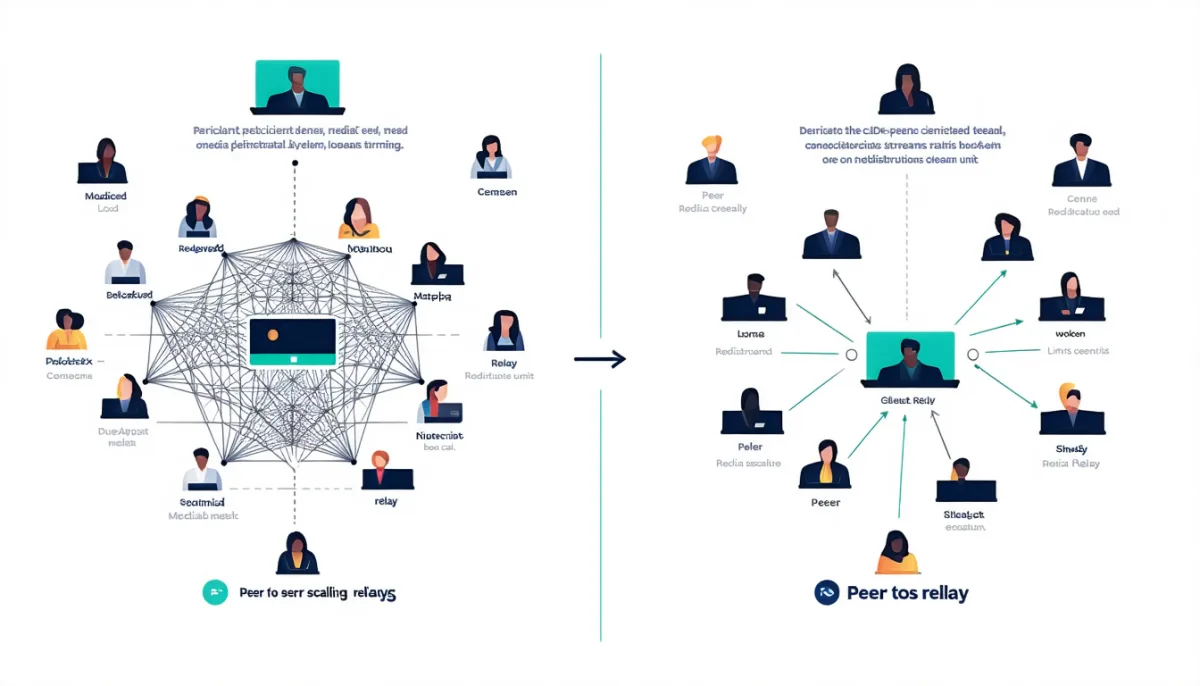
The solution is the Talk High Performance Backend (HPB) — a Selective Forwarding Unit to which each person sends only one stream and which handles distribution. According to the vendor this supports 30–50 active participants, plus hundreds of passive listeners for lecture formats.
The HPB is a partner product and part of the paid Enterprise offering. Which makes the decisive statement for any school district:
“Nextcloud is free” and “Nextcloud can do video conferencing for a class” are two statements that do not hold at the same time.
Anyone needing both has three honest options: buy an Enterprise subscription, run a separate BigBlueButton alongside (the store app bbb supports NC 34 and has 12 stable releases), or deliberately leave video conferencing out of the project and use the state-provided platform for it.
Data protection: the legal situation shifted in 2025 — and many texts have not noticed
The classic opener for Nextcloud in schools goes: “Microsoft 365 is not legally permissible in schools.” That claim comes from the German Data Protection Conference (DSK) decision of 24 Nov 2022, in which the supervisory authorities found that compliant operation of Microsoft 365 could not be demonstrated.
Anyone arguing that way today is arguing from a position that is outdated.
In November 2025, the Hessian Commissioner for Data Protection and Freedom of Information (HBDI) published a final report following negotiations with Microsoft that ran from July 2024 to November 2025. Its conclusion: compliant use of Microsoft 365 is possible if controllers follow certain recommendations — including signing a specially negotiated data processing agreement for public bodies (DPA-öS). Among the reasons the HBDI cites are the EU-US Data Privacy Framework, the EU Data Boundary (nearly all personal data processed within the EEA), and an evolved data protection concept.
The report is controversial and formally applies to Hesse; other supervisory authorities continue to assess independently. But the simple formula “it is banned” no longer holds.
🔑 Why we state this so plainly in a Nextcloud article: an argument resting on outdated law will not survive a school board meeting. Walk in with the 2022 DSK decision, get confronted with the 2025 HBDI report, and you lose the debate — even in cases where Nextcloud would have been the better choice on the merits. A recommendation ages silently; it throws no error when the ground beneath it shifts.
The durable argument for Nextcloud is a different one, and none of this touches it: with Nextcloud, questions of third-country transfers, processing agreements and contractual addenda do not arise in the first place when the server sits in your own administration or with a domestic provider. There is no vendor whose behaviour you need to secure contractually. That is not a legal victory over Microsoft — it is the structurally simpler starting position. Data minimisation through architecture instead of through paperwork.
If you want to go deeper into the technical side of security: we wrote up in IT security vulnerabilities how attacks on self-operated systems actually unfold — including an incident of our own where a server was hijacked for five days without anyone noticing.
What Nextcloud actually costs a school
The licence is free. That is the beginning of the calculation, not the result.
Option A: self-hosted, community version
| Item | Realistic figure (school with ~800 users) |
|---|---|
| Server (dedicated root/VM, 8 cores, 32 GB RAM) | €50–90 / month |
| Storage (2 TB, growing) | €20–40 / month |
| Backup (separate location, mandatory) | €15–30 / month |
| Nextcloud licence | €0 |
| Administration: 2–4 hrs/week | the actual cost item |
The first four lines add up to roughly €1,000–1,900 per year. The fifth line is where projects fail. Two to four hours a week from a public-sector IT employee is €4,000–9,000 a year. If the work is done instead by a teacher on reduced teaching hours, it costs lessons.
What actually happens during those hours: applying maintenance updates, the annual major version upgrade with a prior app compatibility check, verifying backups (not merely running them), password resets, adding storage, rebuilding groups at the change of school year.

Option B: managed hosting with a provider
A specialised provider handles installation, updates and backup. Costs typically land somewhere between a few hundred and a bit over a thousand euros a year, depending on user count and storage. The big advantage for schools is not the price but continuity: somebody is responsible when the person who knew everything leaves the school.
Option C: Nextcloud Enterprise
The official price list quotes Standard at €71.29 per user per year starting at 100 users, Premium at €104.99, Ultimate at €204.75.
Multiplying those list prices by 800 pupils produces a useless number (€57,000) — Nextcloud negotiates separately for educational institutions and explicitly points to quotes on its education page. The list prices are therefore not a basis for calculation here, only an indication of the order of magnitude of the commercial offering.
What matters is what Enterprise actually adds, because only two of those points are usually decisive for schools:
- Maintenance window of up to 5 years instead of one year in the community version. That defuses precisely the upgrade problem described above.
- Access to the Talk High Performance Backend — the prerequisite for class-sized video conferences.
- Scale: Nextcloud itself puts the community version at around 500 users, with Enterprise going considerably beyond that.
The last point is a hard criterion for larger schools: a comprehensive school with 1,200 accounts sits above what the vendor intends the community version for.
And the honest point of comparison
Microsoft provides Microsoft 365 Education A1 free of charge to eligible institutions, and Google Workspace for Education has a free tier. So the cost comparison does not automatically favour Nextcloud — on pure licence price it can even go the other way, because those options carry no server costs and no administration hours.
Anyone arguing for Nextcloud should therefore not argue on price but on control, data sovereignty, absence of advertising, and independence from a corporation’s product decisions. Those are the arguments that hold. “It is cheaper” is often not true under an honest full-cost calculation.
The fourth option many schools overlook: the state platform
Before an individual school starts self-hosting, one question is worth asking: does this already exist in your federal state?
Several German states run central education clouds. Brandenburg, Lower Saxony and Thuringia joined forces in the Schulcloud-Verbund and jointly develop their platforms under an administrative agreement. The Lower Saxony education cloud is operated by the NLQ on behalf of the ministry of education and reaches a scale no individual school could ever manage alone.
These offerings are usually free for schools, pre-vetted for data protection, and professionally administered. The honest recommendation is therefore: first check what your state provides. A dedicated Nextcloud pays off mainly where the state solution is missing, functionally too narrow, or where you deliberately want to keep certain things out of a central system.
A second and very workable path in practice: Nextcloud as a supplement rather than a replacement. The state platform for teaching, a small dedicated Nextcloud for staff and administration — minutes, cover schedules, conference documents, department materials. That scenario has 40 to 100 users instead of 900, sits comfortably within community limits, needs no HPB, and cuts the administration effort to a fraction.
For exactly this small staff-facing use case, one counter-question is worth asking that school guides never raise: does it even need the full feature set? If all you need is files, shares and WebDAV, the alternative is ownCloud Infinite Scale — for us a single process, 255 MB of RAM, no third-party database, meaning considerably less for a school IT team to maintain on the side. The price is the missing app ecosystem, and in education that is often the very argument for Nextcloud. Both sides, with our own measurements, are in Nextcloud vs ownCloud.

A realistic rollout sequence
The measurements above suggest an order that keeps risk small:
Phase 1 — foundation (before the first user). Decide on the server and operating system; for long-term quiet operation, stability matters more than currency (see our comparison Debian vs. Ubuntu). Set up backups and test a restore — a backup never restored is a claim, not a safeguard. Set up the reverse proxy and TLS properly (Nginx as a reverse proxy).
Phase 2 — identity. Connect user management before content exists. Cut groups by cohort, not by class. This decision is painful to correct later.
Phase 3 — core instead of full build-out. Files, group folders, calendar. Deliberately few apps. Every additional app is an annual commitment — the 53.9% figure above is the reason.
Phase 4 — pilot with one cohort. Not the whole school. One year group, one term, real feedback.
Phase 5 — only then communication and video. And decide honestly here: Talk at class size needs HPB, therefore Enterprise — or BigBlueButton alongside, or not at all.
Phase 6 — ensure succession. Two people must be able to run it. This is not a nice-to-have: the most common cause of death for a school Nextcloud is not an attack but the departure of the one teacher who knew everything.
Nextcloud in schools: when it fits — and when it does not
Fits well when:
- Your state provides no usable platform, or the one it provides is functionally too narrow.
- The need sits with staff and administration (40–150 users) — Nextcloud is nearly unbeatable there.
- IT competence exists and at least two people carry it.
- Data sovereignty is a stated goal of the school leadership, not just of IT.
- A directory service already exists that you can attach to via LDAP.
Fits badly when:
- Class-sized video conferencing is a core requirement and there is no budget for Enterprise or BigBlueButton.
- Only one person would be responsible. Then the answer is a managed provider, not self-hosting.
- The main reason is “it is free”. Under an honest full-cost calculation that is often untrue against free A1/Education tiers.
- User numbers are well above 500 and the community version is planned — that is above what the vendor intends.
- What you actually want is a full LMS. Nextcloud is not a learning management system. Moodle is — and the two complement each other well, as shown above.
Frequently asked questions
What exactly is the Nextcloud Education Edition?
Not a separate product, but a bundle of seven apps defined in the Nextcloud server as the PHP class EducationBundle: dashboard, circles (Teams), groupfolders, announcementcenter, quota_warning, user_saml and whiteboard. Talk, Office, calendar and LMS integration are not included. Two of the seven ship with the server anyway.
Is Nextcloud really free for schools?
The software yes, the operation no. Server, storage and backup run roughly €1,000–1,900 a year for a mid-sized school. The bigger item is staff time: 2–4 hours per week. Two capabilities schools often assume are standard belong to the paid Enterprise offering — the maintenance window of up to five years, and the Talk High Performance Backend for large video calls.
How many participants can a Nextcloud Talk video call handle?
Without an additional component, roughly 20 people according to Nextcloud’s own documentation — and only if everyone turns their camera off. With video, 5–10 is realistic, because bandwidth grows at 1 Mbit/s × (participants − 1) per person. A full class with video requires the Talk High Performance Backend (30–50 active participants), which is part of the commercial offering. Alternative: run BigBlueButton alongside.
Can Nextcloud be connected to Moodle?
Yes — but from the Moodle side. The Nextcloud app integration_moodle stalled at version 1.0.2 from 2021 and supports Nextcloud 24 at most (current is 34). Moodle, by contrast, ships the maintained repository_nextcloud plugin in its core, version stamped April 2026. The connection is configured in Moodle under Plugins → Repositories and authenticated via OAuth 2 against Nextcloud.
How many users can one Nextcloud installation handle?
Nextcloud itself states around 500 users for the community version, with Enterprise installations scaling considerably further. A large school with more than 1,000 accounts therefore sits above what the free variant is intended for. For staff and administration (40–150 users), the community version is entirely sufficient.
Is Microsoft 365 banned in schools?
Not categorically, and the widespread claim is outdated. The German Data Protection Conference decision of 24 Nov 2022 found that compliant operation could not be demonstrated. However, after negotiations with Microsoft, the Hessian data protection commissioner concluded in November 2025 that compliant use is possible if certain recommendations are followed — citing among other things the EU Data Boundary and a newly negotiated processing agreement for public bodies. That assessment is contested and formally limited to Hesse; other authorities decide independently.
How often must a school Nextcloud be updated?
Each major version is maintained for one year from release, after which there are no security updates. Major versions must not be skipped — the path runs sequentially through every version. In practice: at least one planned major upgrade per year, plus ongoing maintenance updates. Before each upgrade you must verify that every installed app supports the target version.
Which apps should a school install?
As few as possible, and only ones with a visible release history. Our measurement of 14 Aug 2026: of 681 apps with stable releases, only 53.9% support the current version 34, while 23.5% do not even reach Nextcloud 30. Every installed app can block the annual server upgrade. Good candidates show many releases over a long period — groupfolders, for example, has 252 stable releases.
Conclusion
Nextcloud is a good choice for schools — but for different reasons than are usually given, and with different limits than the name “Education Edition” suggests.
What we measured:
- The Education bundle is seven apps, two of which ship with the server anyway. No Talk, no Office, no LMS. It is a supplement, not a complete package.
- 53.9% of the app store supports the current version, 23.5% has effectively been abandoned. With one year of maintenance per major version and no way to skip versions, every installed app is an annual commitment.
- The Moodle integration works — from the Moodle side. The Nextcloud app for it has been dead since 2021; the Moodle core plugin is current. Look in only one direction and you reach the wrong diagnosis.
- Talk cannot carry a school class without HPB, and HPB is commercial. That is the single most important piece of information for any procurement decision.
- The data protection argument from 2022 is outdated. Bring it to a meeting and you may lose against a report from 2025.
And the recommendation that follows from all of it: most schools should not start with a school-wide Nextcloud. They should check what their state provides, and deploy Nextcloud where it is unbeatable — as a dedicated, manageable platform for staff and administration, with LDAP, few apps, a tested backup, and two people who can look after it.
That is less spectacular than “we are replacing Microsoft”. In return, it still works after the colleague who set it all up has long since moved to another school.